
Preventing Accidental Logging of Sensitive Data
Scan Tools vs. Real-Time Filtering
In the world of application development and system operations, accidental logging of sensitive data is a significant concern. This oversight can lead to security breaches, compliance violations, and loss of user trust. This article examines two approaches to prevent this issue: scan tools that analyze logs for sensitive data, and real-time filtering tools that intercept and sanitize log entries before they're written.

The Problem: Accidental Logging of Sensitive Data
Developers and systems often log extensive information for debugging, monitoring, and analytics purposes. However, this can inadvertently include sensitive data such as:
Passwords
API keys
Personal Identification Information (PII)
Financial data
Health information
Accidental logging typically occurs due to:
Overly verbose logging settings
Inadequate sanitization of input data
Errors in log formatting
Third-party libraries with unexpected logging behavior
Scan Tools: Post-Hoc Log Analysis
Scan tools operate by analyzing log files after they've been written, searching for patterns that indicate sensitive data.
How It Works
Logs are written normally.
The scan tool periodically analyzes log files.
If sensitive information is detected, it's flagged or redacted.
Alerts are sent to the security team.
Advantages:
Comprehensive Coverage: Can analyze all historical logs.
Pattern Recognition: Effective at identifying known patterns of sensitive data.
Non-Intrusive: Doesn't affect the logging process itself.
Disadvantages:
Delayed Detection: Sensitive data may exist in logs for some time before detection.
Resource Intensive: Scanning large log files can be computationally expensive.
Limited Context: May struggle with novel or context-dependent sensitive data.
Implementation Example
A financial services company implemented a log scanning tool that runs nightly. It successfully identified several instances of accidentally logged credit card numbers, allowing the team to update their logging practices and securely delete the affected logs.
Real-Time Filtering: Proactive Log Sanitization
Real-time filtering tools intercept log entries before they're written and sanitize any sensitive data.
How It Works
Application generates a log entry.
The real-time filter intercepts the entry.
The filter analyzes the content for sensitive data.
If found, sensitive data is redacted or tokenized.
The sanitized log entry is written to the log file.
Advantages:
Immediate Protection: Sensitive data never makes it to the log file.
Context Awareness: Can make decisions based on the current application state.
Flexible Rules: Can be updated quickly to address new types of sensitive data.
Disadvantages:
Performance Impact: Real-time filtering adds some overhead to logging operations.
Configuration Complexity: Requires careful setup to balance security and useful logging.
Potential for False Positives: Overzealous filtering might remove important debug information.
Implementation Example
A healthcare startup implemented a real-time log filtering system. It successfully prevented accidental logging of patient information in 99.9% of cases, with minimal impact on application performance.
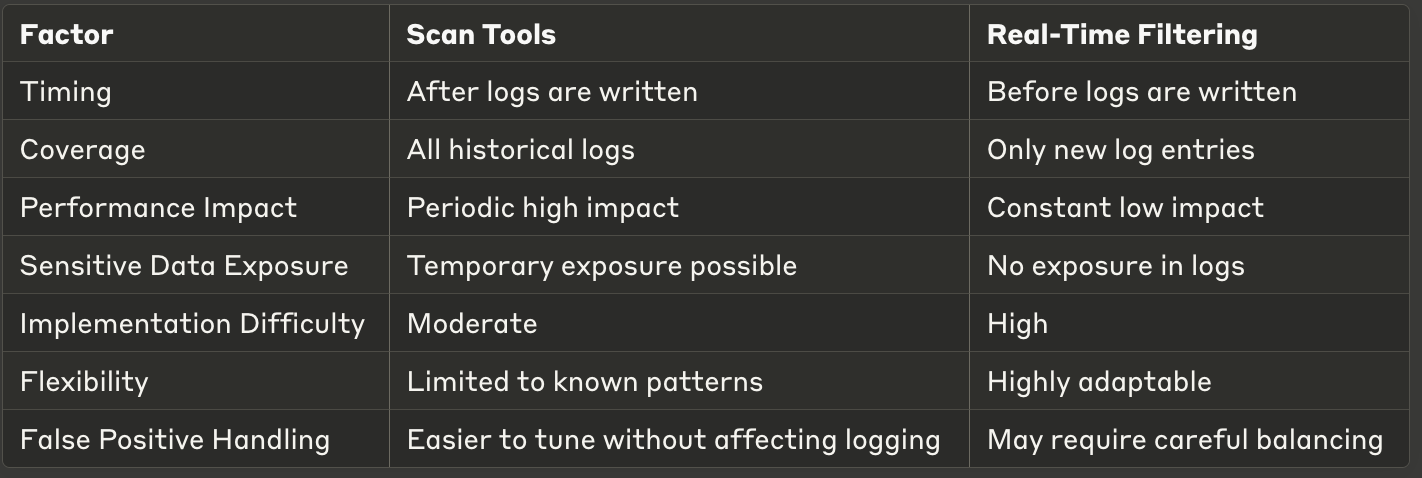
Comparison: Scan Tools vs. Real-Time Filtering
Hybrid Approach: Comprehensive Log Protection
Many organizations implement both methods for maximum protection:
Real-time filtering prevents most instances of sensitive data logging.
Scan tools act as a safety net, catching any data that slips through.
This approach provides immediate protection while also offering thorough, retrospective analysis.
Best Practices for Preventing Accidental Logging
Regardless of the tool chosen, consider these best practices:
Classify Data: Clearly define what constitutes sensitive data in your organization.
Developer Training: Educate developers about the risks of logging sensitive data.
Log Level Management: Use appropriate log levels to minimize unnecessary verbose logging.
Input Sanitization: Implement robust input sanitization before logging.
Regular Audits: Periodically review logging practices and logged data.
Automated Testing: Implement tests that check for accidental logging of sensitive data.
Third-Party Library Review: Carefully vet third-party libraries for their logging behaviors.
Conclusion
Preventing accidental logging of sensitive data is crucial for maintaining security and compliance. While scan tools offer comprehensive coverage and are less intrusive, real-time filtering provides immediate protection at the cost of some complexity.
The choice between these approaches—or the decision to implement both—depends on your specific needs, regulatory requirements, and technical environment. Consider factors such as the sensitivity of your data, your performance requirements, and your team's capacity for implementing and maintaining these systems.
By carefully evaluating these options and implementing robust practices, you can significantly reduce the risk of sensitive data exposure through logs, protecting your users and your organization.